Slicing
The user can perform slicing of a data set by either time or sample log (but not both). Data
reduction is performed separately on each slice according to the specified reduction parameters.
The output files will have a slice index appended to the configured "outputFileName", e.g.
myFileName_0_Iq.dat, myFileName_1_Iq.dat, etc.
For EQSANS run in frame-skip mode, each frame will have its own time slices.
Thus, output files will also contain the frame index, e.g.
myFileName_0_frame_0_Iq.dat and myFileName_0_frame_1_Iq.dat.
If wedge binning is selected, the wedge label appears between the slice and frame labels,
e.g. myFileName_0_wedge_0_frame_0_Iq.dat. PNG plot filenames follow the
same convention as the corresponding reduced data files.
Time Slicing
The user can specify time slicing to slice a run by time intervals and, optionally, a time period. The following parameters specify the time slicing:
{
    "useTimeSlice": true,
    "timeSliceInterval": 4800,
    "timeSliceOffset": 0.0,
    "timeSlicePeriod": null,
}
Example 1: Slicing using time interval
{
    "useTimeSlice": true,
    "timeSliceInterval": 2.0,
    "timeSliceOffset": 0.0,
    "timeSlicePeriod": null,
}
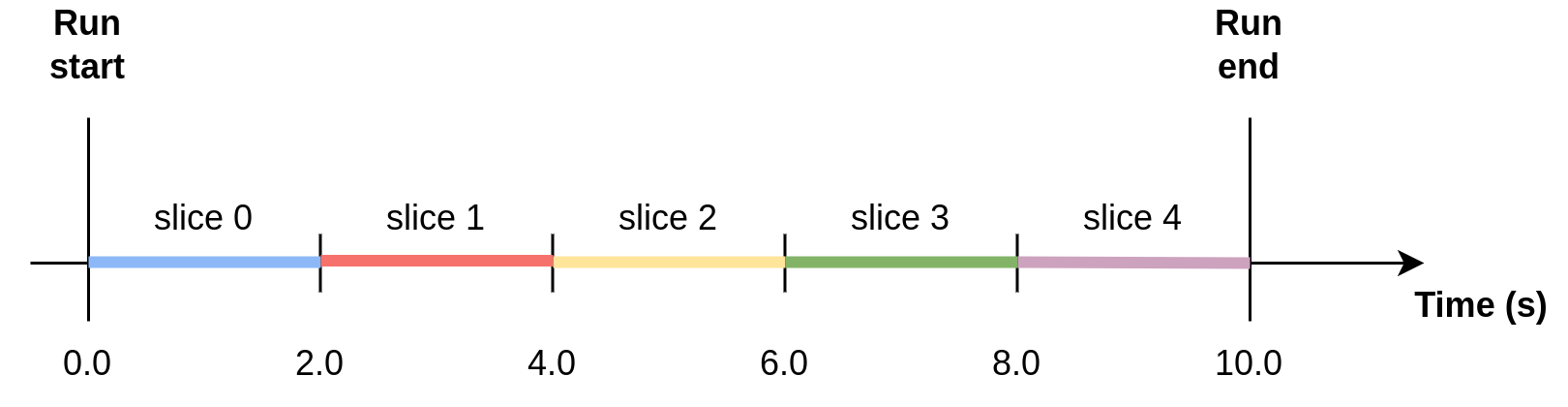
Example 2: Slicing using time interval and offset
{
    "useTimeSlice": true,
    "timeSliceInterval": 2.0,
    "timeSliceOffset": 1.0,
    "timeSlicePeriod": null,
}
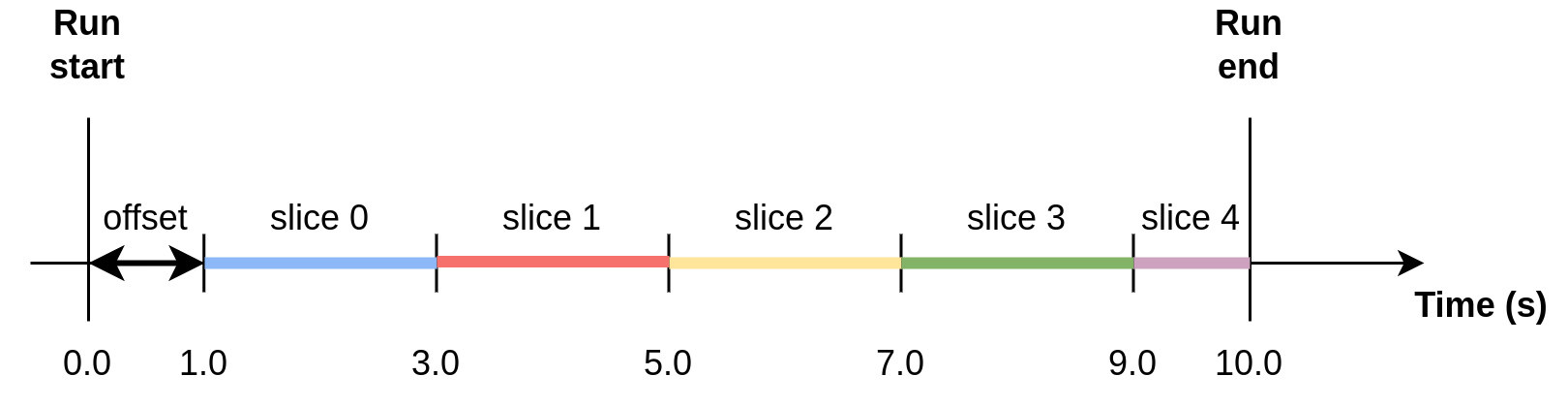
Example 3: Slicing using time slice period
When using a time slice period, slices for a given time interval are reduced together. In the figure, red slices are reduced together, and blue slices are reduced together.
{
    "useTimeSlice": true,
    "timeSliceInterval": 2.0,
    "timeSliceOffset": 0.0,
    "timeSlicePeriod": 4.0,
}
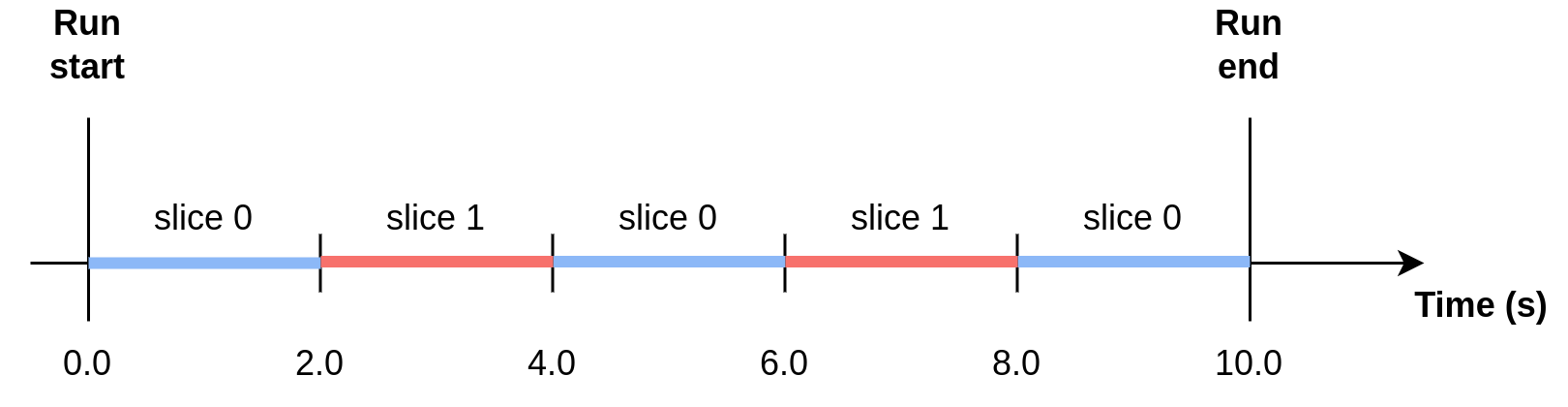
Note: if the time slice interval is a non-integer multiple of the period, then the remainder will be the last of the slices. In the example below, there will be two 3 second slices, then one 2 second slice.
{
    "useTimeSlice": true,
    "timeSliceInterval": 3.0,
    "timeSliceOffset": 0.0,
    "timeSlicePeriod": 8.0,
}
Example 4: Time slicing and event filtering during loading
The time slicing parameters are applied relative to the whole data from the beginning to the end of
the run, independent of any event filtering during loading (i.e. using the parameter
"loadOptions").
This example shows EQSANS (SNS time-of-flight instrument) configuration:
{
    "sample": {
        "loadOptions": {"FilterByTimeStart": 2.0, "FilterByTimeStop": 8.71}
    },
    "configuration": {
        "useTimeSlice": true,
        "timeSliceInterval": 2.0,
        "timeSliceOffset": 0.0,
        "timeSlicePeriod": 4.0,
    }
}
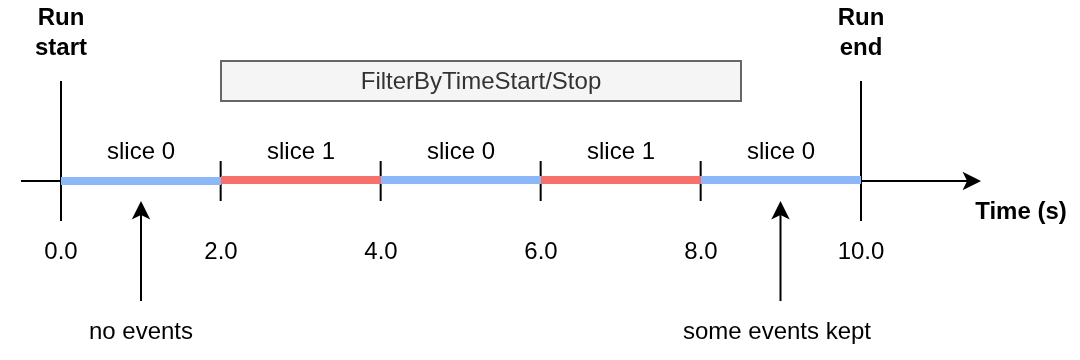
Event Filtering for BIOSANS and GPSANS
BIOSANS and GPSANS (HFIR monochromatic instruments) also support event filtering using
loadOptions. The same FilterByTimeStart and FilterByTimeStop parameters can be used
to filter events before reduction. These options are passed directly to the Mantid algorithm
LoadEventAsWorkspace2D.
Example for BIOSANS or GPSANS:
{
    "instrumentName": "BIOSANS",
    "sample": {
        "runNumber": "1322",
        "loadOptions": {"FilterByTimeStart": 10.0, "FilterByTimeStop": 300.0}
    },
    "configuration": {
        ...
    }
}
When using loadOptions with time slicing on HFIR instruments, the time filtering is applied
first during loading, and then the time slicing is applied to the filtered events. This allows for
fine-grained control over which portion of the run to analyze.
Note
The FilterByTimeStart and FilterByTimeStop parameters specify times in seconds relative
to the start of the run. For HFIR instruments (BIOSANS and GPSANS), these options are passed to
LoadEventAsWorkspace2D, while for SNS instruments (EQSANS), they are passed to LoadEventNexus.
Log Slicing
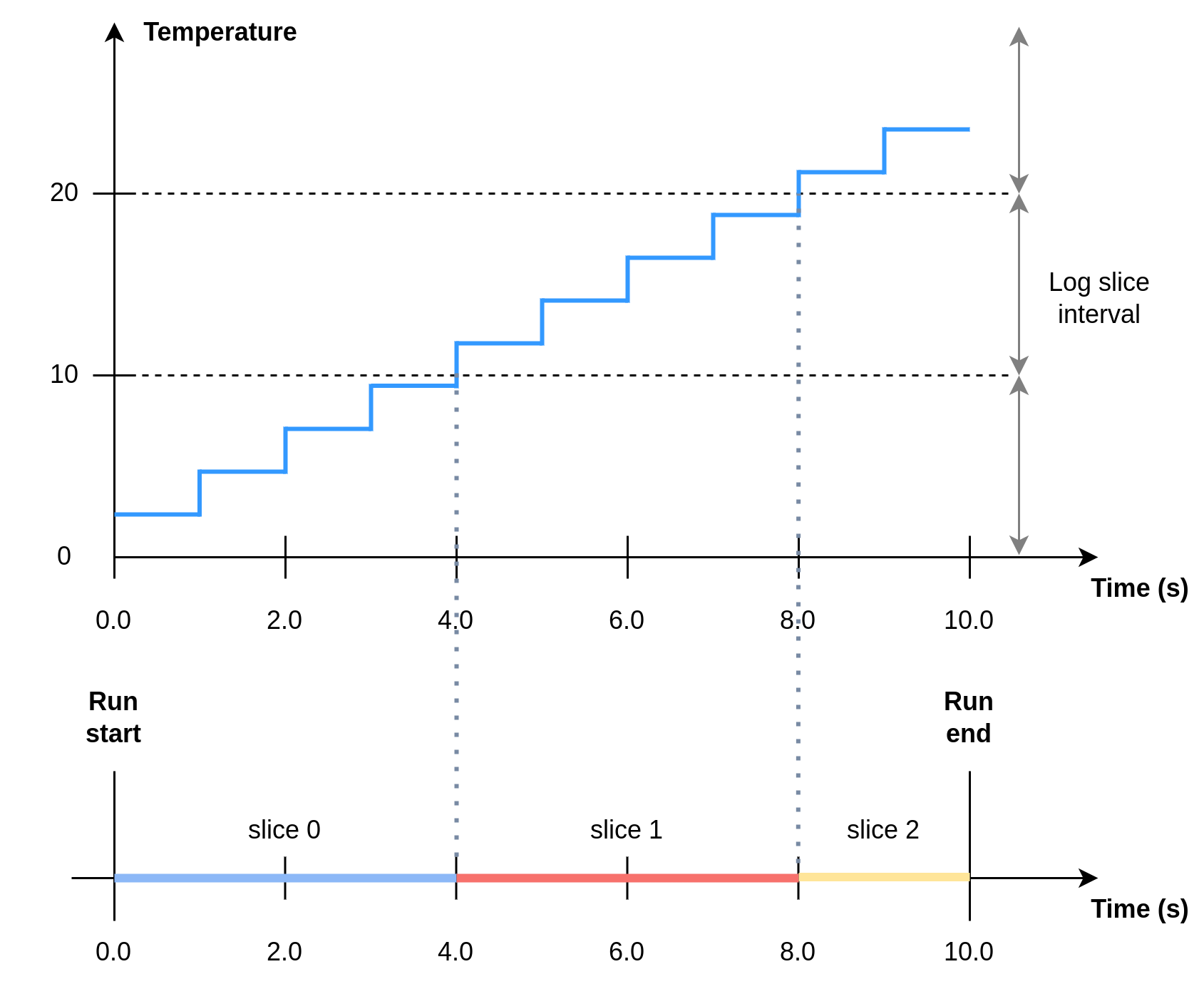
Log slicing refers to slicing by the value of a sample log in the NeXus file corresponding to the sample run.
{
    "useLogSlice": true,
    "logSliceName": "MySampleLog",
    "logSliceInterval": 200.0,
}
Example: Log slicing using log “Temperature”
{
    "useLogSlice": true,
    "logSliceName": "Temperature",
    "logSliceInterval": 10.0,
}
Slicing and Error-Weighted Binning
Note that using error-weighted averaging in combination with slicing may result in disparity between time sliced and non-time sliced data if there is not enough data in the slices for the error distribution to converge.
{
    "useErrorWeighting": true,
}
Figure 1 compares I(Q) for the whole run (blue dot markers) to I(Q) for time slices of the data (solid lines) for the time slice intervals 600 s, 1200 s, 2400 s and 4800 s. The time sliced I(Q) converges to the total I(Q) with increasing time slice interval.
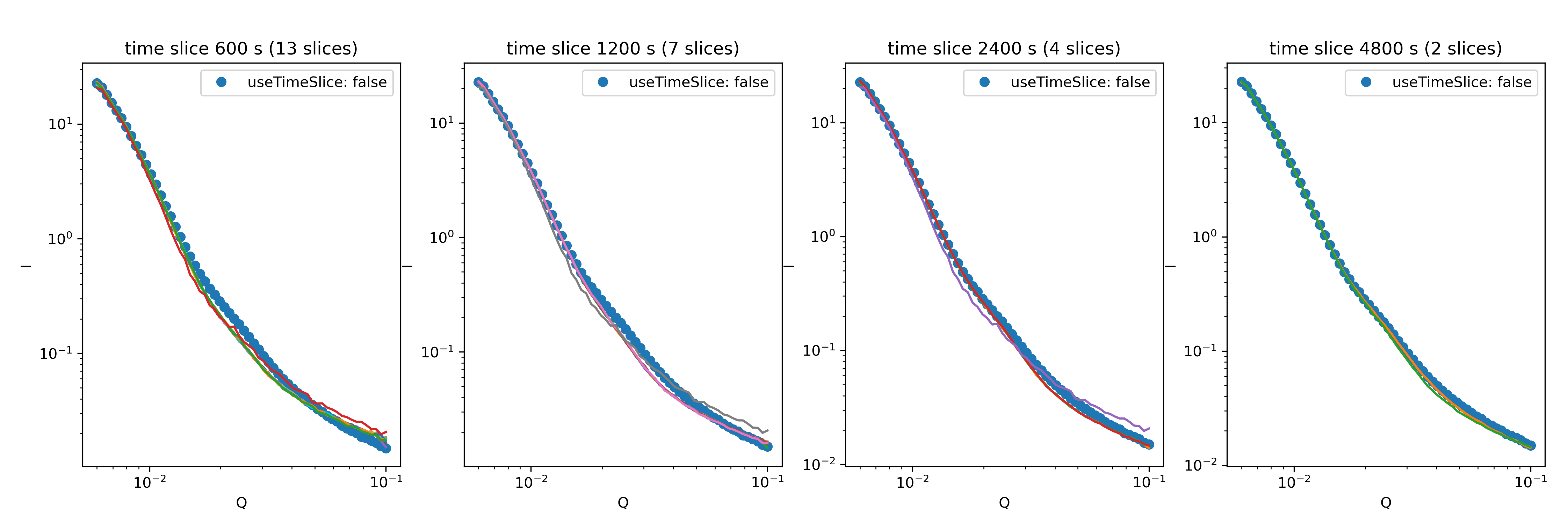
Figure 1: I(Q) for time slices of a run compared to the total run for different time slice intervals and
with error-weighted averaging ("useErrorWeighting": true).
In Figure 2, the same comparison between time sliced and non-time sliced data but with error-weighted averaging turned off (i.e. using arithmetic averaging) shows no dependence on the time slice interval.
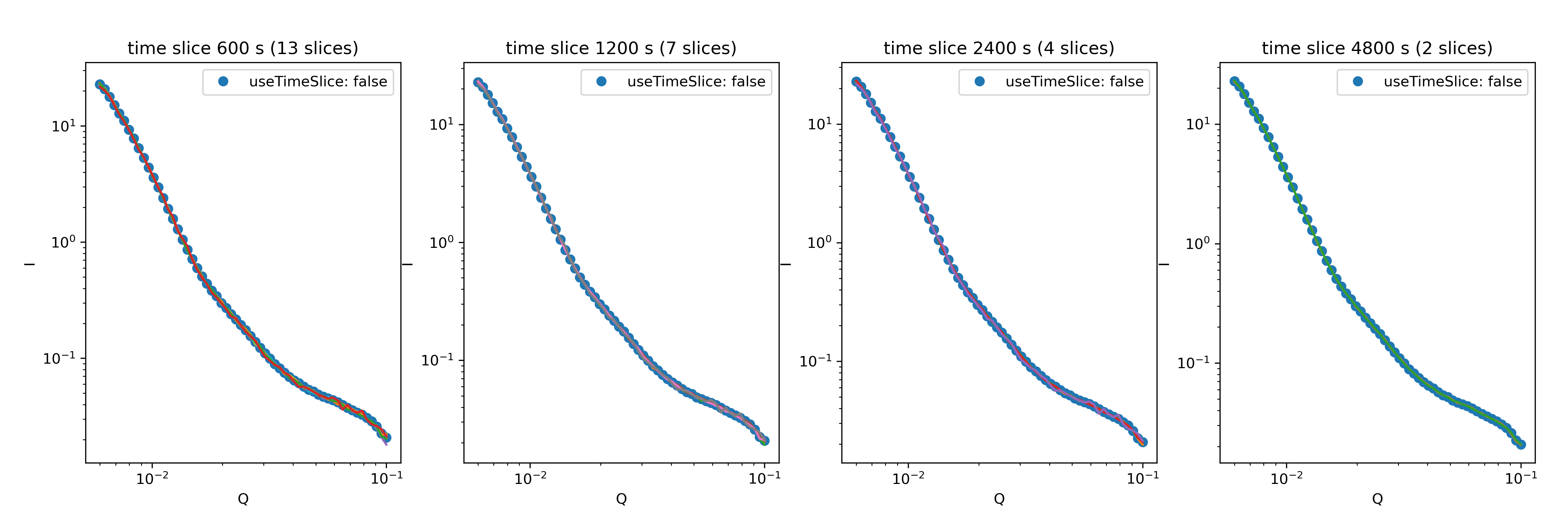
Figure 2: I(Q) for time slices of a run compared to the total run for different time slice intervals and
with error-weighted averaging ("useErrorWeighting": false).