Autoreduction
Python scripts for automatic reduction of SANS data are provided in the scripts/autoreduction/ directory.
These scripts are designed to be run by the SNS web monitor but also from the command line.
Required arguments for the scripts include:
Events Nexus file, e.g.,
/SNS/EQSANS/IPTS-20196/nexus/EQSANS_89157.nxs.h5Output directory, e.g.,
/SNS/EQSANS/IPTS-20196/shared/autoreduction/
Example of the autoreduction service running the script:
python reduce_EQSANS.py \
    /SNS/EQSANS/IPTS-20196/nexus/EQSANS_89157.nxs.h5 \
    /SNS/EQSANS/IPTS-20196/shared/autoreduction/
User can also run the script manually, for instance:
python reduce_EQSANS.py \
    /SNS/EQSANS/IPTS-20196/nexus/EQSANS_89157.nxs.h5 \
    /tmp --no_publish
This call will not publish the results to the live data server,
but will save report file EQSANS_89157.html in the /tmp directory.
User can point the web browser to the generated report file file:///tmp/EQSANS_89157.html.
Input Configuration
The autoreduction script will automatically look for an input configuration file in three locations, in the following order of precedence:
Under the
shareddirectory of the current IPTS and taking into account the run number. For example, for IPTS-20196 and run number 89157, the script will look for/SNS/EQSANS/IPTS-20196/shared/autoreduce/89157/reduction_options_89157.json.Under the
shareddirectory of the current IPTS. For example, for IPTS-20196, the script will look for/SNS/EQSANS/IPTS-20196/shared/autoreduce/reduction_options.json.File
/SNS/EQSANS/shared/autoreduce/reduction_options.json.
Whichever file is chosen, the script overrides beamCenter/useFallbackBeamCenter and sets it to true,
even if the file asks for false. When center-of-mass beam finding is used, the coordinates in
beamCenter/fallbackBeamCenter are also used as the initial estimate unless explicit CenterX and
CenterY values are provided through beamCenter/com_centering_options. This gives the iterative search a
physically plausible starting point. An unattended reduction should produce a report rather than stop, so when
the beam center calculation fails to converge or returns a non-finite coordinate, the fallback coordinates are
assumed instead and the substitution is reported as a warning. The initial estimate does not constrain the search;
for asymmetric or background-dominated detector data, configure a finite IntegrationRadius as needed.
Output Files
For IPTS-20196 and run number 89157, all reduction files are saved under directory
/SNS/EQSANS/IPTS-20196/shared/autoreduction/89157/. Among them:
EQSANS_89157.html- the same report that shows up in the web monitor.EQSANS_89157_Iq.datandEQSANS_89157_Iq.png- 1D reduced data file and plot.EQSANS_89157_Iqxqy.dat,EQSANS_89157_Iqxqy.h5,EQSANS_89157_Iqxqy.png- 2D reduced data files and plot.EQSANS_89157_processed.nxs- I(lambda) per detector pixel.EQSANS_162568_reduction_log.hdf- HDF5 file with reduction-derived parameters (transmission, center, etc).autoreduce_89157.log- log file with detailed information about the reduction steps at levelINFOand above.reduction_options_89157.json- input configuration options, completed with any missing default values. If User requests to autoreduce the same run again, this file will be used as input configuration.
Additionally, if GPR analysis is enabled (which it is by default), the following files will also be generated:
EQSANS_89157_Iq_gpr.png- High-resolution plot showing the GPR fit alongside the experimental data.EQSANS_89157_Iq_gpr.dat- ASCII file with the GPR-fitted I(Q) profile including uncertainties.
For reductions with multiple I(Q) profiles (wedges or time slices), separate GPR files are created for each:
EQSANS_89157_wedge_0_Iq_gpr.png,EQSANS_89157_wedge_0_Iq_gpr.datEQSANS_89157_wedge_1_Iq_gpr.png,EQSANS_89157_wedge_1_Iq_gpr.datand so on for each wedge or time slice.
Gaussian Process Regression Analysis
The EQSANS autoreduction now includes Gaussian Process Regression (GPR) analysis of the calculated I(Q) profiles. This analysis provides uncertainty-quantified fits to your scattering data and appears directly in the HTML report.
What GPR Does
GPR fits a smooth curve through your I(Q) data while accounting for measurement uncertainties. It gives you:
A noise-reduced representation of your scattering profile
Quantified uncertainties on the fit
Better visualization of underlying trends in noisy data
The algorithm uses log-space transformations optimized for SANS data and includes iterative background estimation. Interactive Plotly plots are embedded in the HTML report, allowing you to zoom and explore your data.
Configuration
GPR analysis runs automatically by default. If you want to disable it, add this to your reduction configuration JSON file:
{
    "configuration": {
        "enableGPR": false
    }
}
Error Handling
GPR analysis is designed to never break your reduction. If GPR fails for any reason:
The failure is logged but doesn’t stop the reduction
Other reduction outputs are still generated normally
Error details appear in the log file
This means you can safely leave GPR enabled even for challenging datasets.
Resubmitting Autoreduction
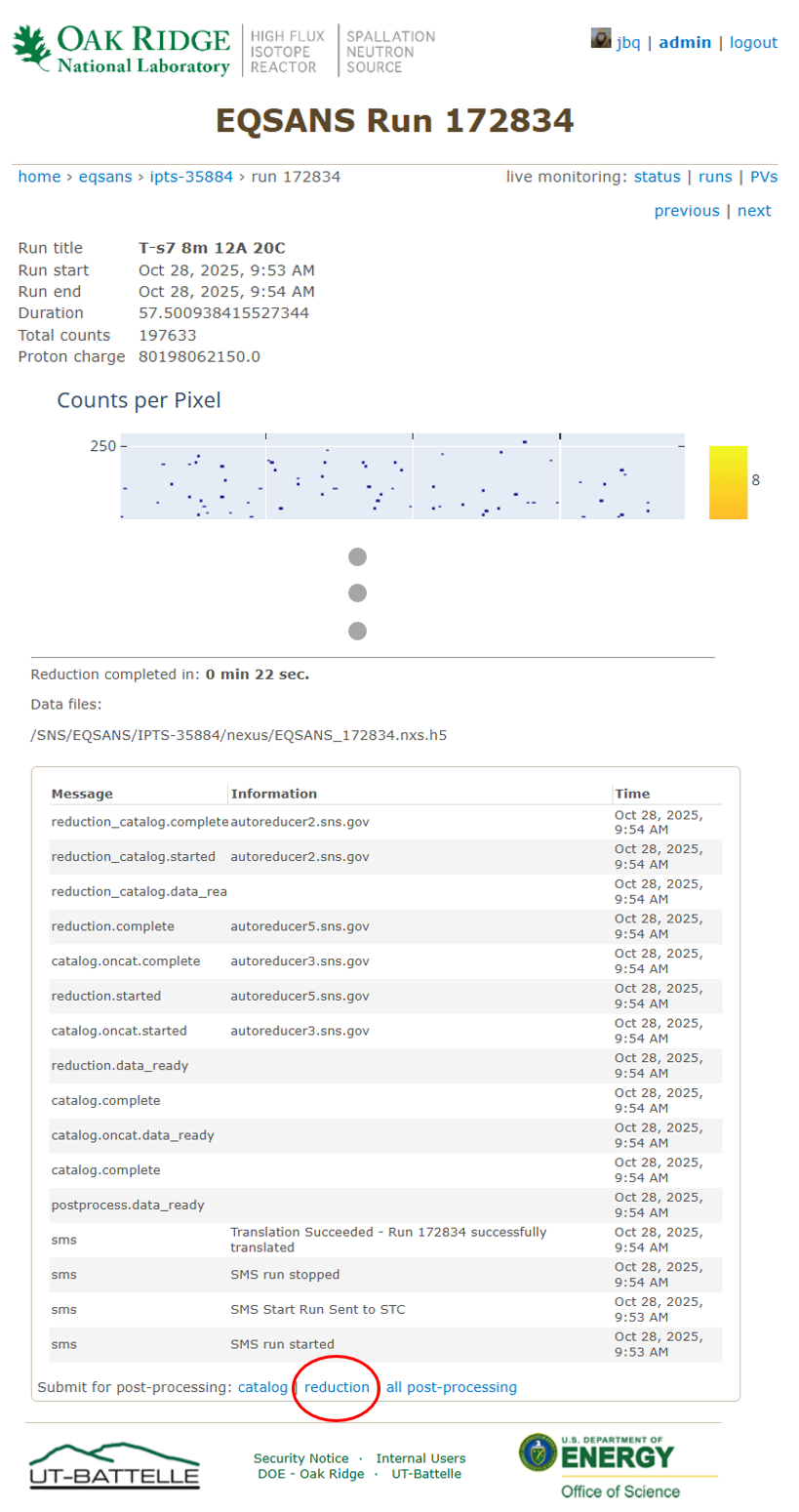
User can resubmit the autoreduction for a given run, perhaps after modifying one of the reduction options files under the current IPTS, then clicking the reduction link located at the bottom on the web monitor page for that run. For example:
TroubleShooting
If autoreduction fails, any log error messages as well as the traceback will be saved in the HTML report file
as well as published to the live data server (if option --no_publish is not used).
Livereduction
Python scripts for automatic reduction of SANS data are provided in the scripts/livereduction/ directory.
These scripts are meant to be run automatically by the live reduction server, never directly by the User.
How Live Reduction Works
Live reduction processes neutron scattering data as it is being collected during a run, before the final Nexus file is written to disk. The workflow:
Mantid’s
LoadLiveDataalgorithm continuously monitors the data stream from the instrumentWhen new data arrives, it calls the live reduction script (e.g.,
reduce_EQSANS_live_post_proc.py)The script receives an EventWorkspace containing the accumulated events
Since no persistent Nexus file exists yet, the script:
Saves the EventWorkspace to a temporary processed Nexus file using
SaveNexusProcessedPasses the temporary file path to the standard reduction pipeline
Cleans up the temporary file after reduction completes
The reduction results are published to the live data server for immediate viewing
This approach allows live reduction to use the same reduction code as autoreduction, ensuring consistency between live and post-run results.
Technical Details
The live reduction implementation uses a fallback loading mechanism:
When
allow_processed_nexus=Trueis passed toload_events(), the loader will:First attempt to load the file as an event Nexus file using
LoadEventNexusIf that fails, fall back to
LoadNexusProcessedfor processed Nexus files
This allows the same loading code to handle both standard autoreduction (event Nexus files) and live reduction (temporary processed Nexus files)
Temporary files are created in a secure temporary directory and automatically cleaned up after reduction
Output Files
Live reduction generates the same output files as autoreduction, published to the live data server:
HTML report with plots and reduction parameters
1D and 2D reduced data files (.dat, .h5, .png)
Processed workspace (.nxs)
Reduction log (.hdf)
Configuration file (.json)
If GPR analysis is enabled, GPR-fitted I(Q) profiles are also included in the live reduction results.